Incredible Value
Each replacement ink bottle set is equivalent to about 90 individual cartridges (7).
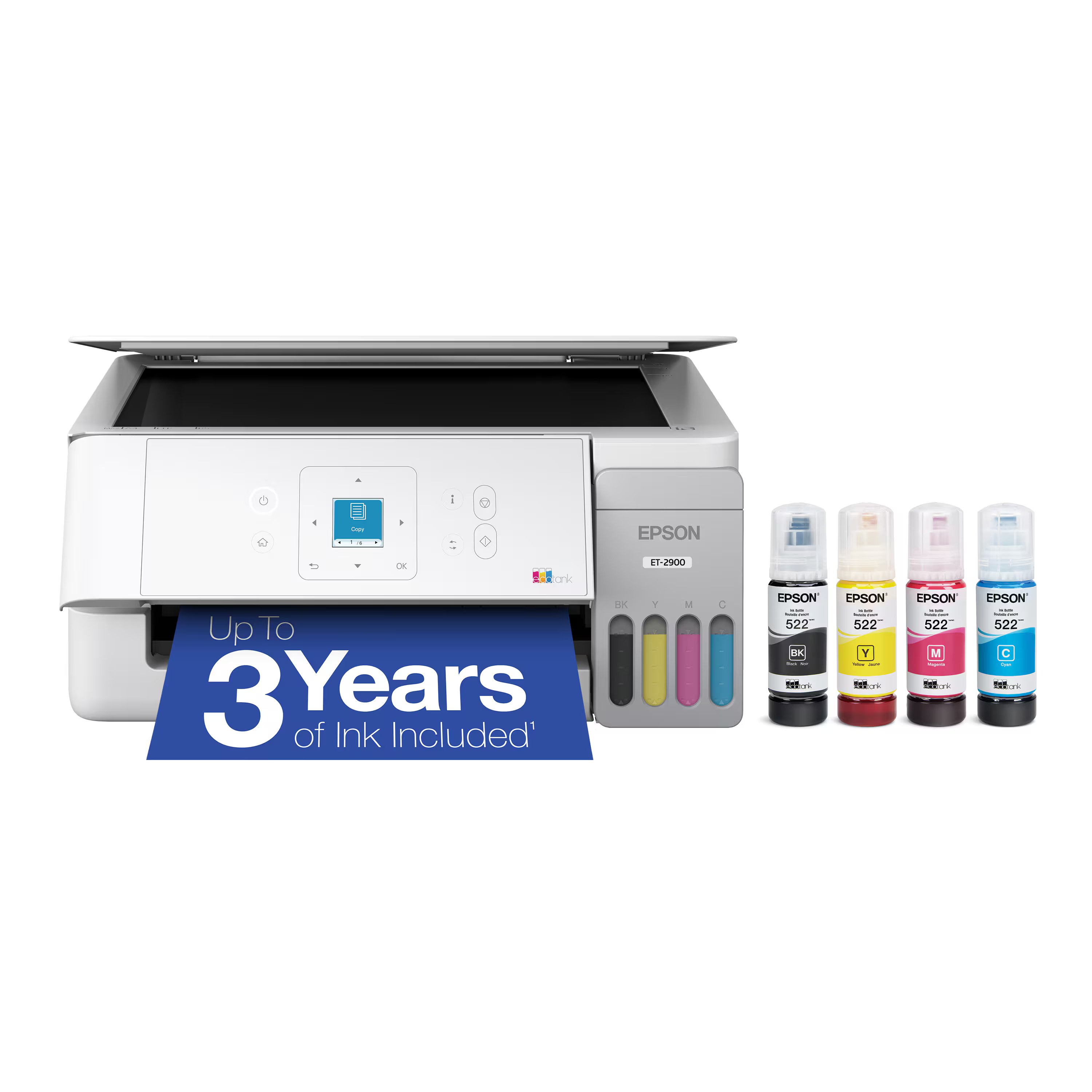
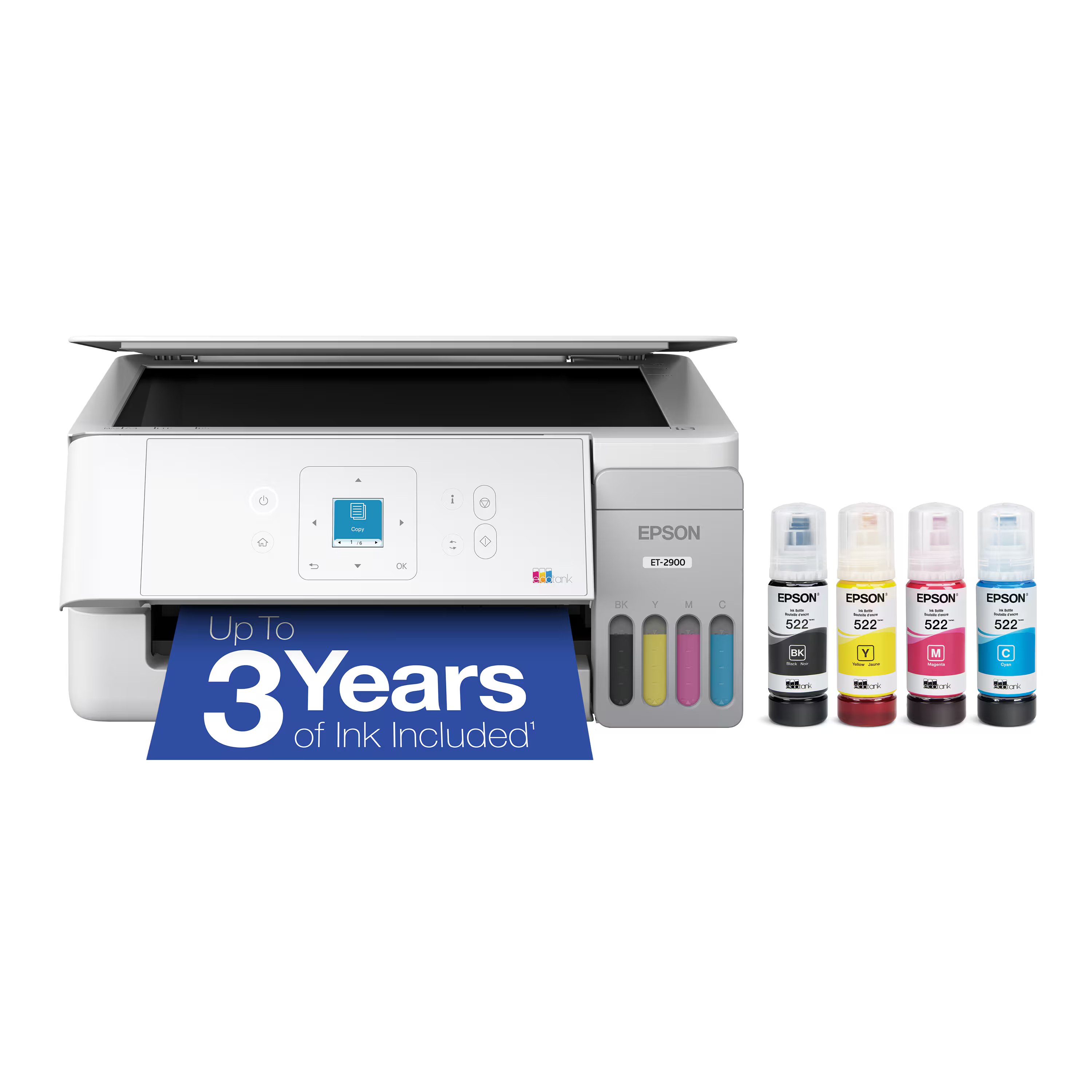
Up To 3 Years Of Ink Included In The Box (2)
Comes with enough ink to print up to 6,600 pages black/5,500 color (8) for worry-free printing and fewer out-of-ink frustrations.
Simple Ink Refilling
Supersized ink tanks and unique EcoFit bottles make refilling ink simple without the worry of drying out.
Wireless Mobile Printing (4)
Print and scan from the convenience of your smart device with enhanced mobile printing from the Epson Smart Panel app (3).
Engineered For Reliability
Unique permanent printhead designed to last the life of the printer—with improved duty cycles compared to previous generations.
Zero Cartridge Waste
Join the club with the millions of EcoTank owners who’ve already helped to reduce millions of pounds (9) of plastic from going into landfills.
The Perfect Family Printer
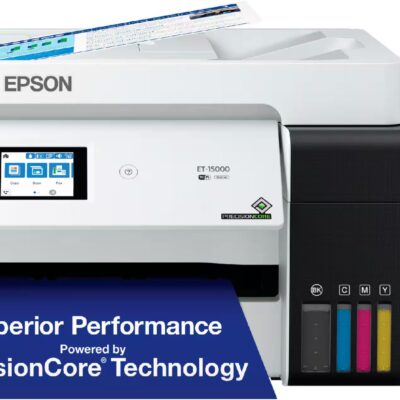
Our affordable wireless cartridge-free printer with 1.44" color screen, auto duplex printing, 100-sheet paper tray and built-in scanner.
Use Genuine Epson Ink
For optimal print quality and performance. Non-genuine ink could cause damage not covered by the printer’s limited warranty.
Specifications
Details 45
Color
Black | White
Brand
Epson
Model Number
C11CL41201
Product Name
Epson EcoTank ET-2980 Wireless All-in-One Color Supertank Inkjet Printer
Networking
Wireless
ENERGY STAR Certified
Yes
Product Height
7.4 inches
Product Width
14.8 inches
Product Depth
13.7 inches
Product Weight
11.5 pounds
Automatic Document Feeder
No
Photo Printing
Yes
Wide Format Printing
No
Wide Format Scanning
No
Printer Type
Printer
Monochromatic/Color
Color
Wired Connectivity
USB-B
Wireless Connectivity
Wi-Fi
Automatic Reduction/Enlargement
Yes
Automatic Two-Sided Printing
Yes
Tray Capacity
100
Scanner Type
Flatbed
Duty Cycle
Up to 5,000
Compatible Cartridges
Epson T502
Ink Cartridges Required
None
Ink Cartridges Included
None
Ink Bags/Bottles Required
1 x Black
Ink Bags/Bottles Included
1 x Black
Supported Paper Sizes
3.5" x 5", 4" x 6", 5" x 7", 8" x 10", 8.5" x 11", 8.5" x 14"
Paper Feeder
Top loader
Maximum Number Of Copies
99
ISO Color Print Speed
8 pages per minute
ISO Mono Print Speed
15 pages per minute
Printer Resolution (Black)
Up to 4800 x 1200
Printer Resolution (Color)
Up to 4800 x 1200
Approximate Page Yield (Black)
6600
Approximate Page Yield (Color)
5500
Scanner Resolution
Up to 1200 x 2400
Output Tray Capacity
30
Touch Screen
No
Warranty - Parts
1 year limited
Warranty - Labor
1 year limited
Display Screen
Yes
Display Screen Size
1.44 inches
UPC
198390000561 | 198390000554
No specifications match your search. Try a shorter word, like “port” or “weight”.
Customer reviews
4.5
28 ratings 89% rated 4 stars or higher
ItsmeitsmeitsearnestTVerified purchase
Rated 1 out of 5Sep 5, 2026
But to be fair I have not read all the instruction I just wanted to plug it in an print however if that is what you want don't buy this printer. I am old and just want to print stuff don't need fancy I liked my old one better but I let my husband talk me into this. Not happy.
Helpful?
WilliamHVerified purchase
Rated 5 out of 5Aug 7, 2026
Great printer, easy setup, just follow the instructions on the screen.
Helpful?
AnaMariaVerified purchase
Rated 5 out of 5Jul 24, 2026
I’m a big crafter and this printer has done miracles for my colors on my many projects. I am really enjoying it.
Helpful?
CONNIEBVerified purchase
Rated 5 out of 5Jul 10, 2026
I haven't used it yet too much, but so far it's easy and the print quality is great! For the price and what you get I recommend this printer 100%. The only negative was the set up process - getting it loaded on to my laptop tool a bit of time. But the step by step instructions were great and it all worked out fine.
Helpful?
CAROLNVerified purchase
Rated 5 out of 5Jul 3, 2026
Right on funtionality and price for home office use. No forced ink subscription or hidden shutdown settings associated with replacement cartridges, will never purchase another HP printer! Also happy with Best Buy's price adjust, item went on sale a few days after I bought it and they promptly and courteously refunded the difference.
Helpful?
DavidHVerified purchase
Rated 5 out of 5Jul 1, 2026
I've been extremely impressed with the Epson EcoTank ET-2980. The print quality is sharp for both documents and color graphics, and the setup was quick and straightforward. The wireless connection has been reliable, making it easy to print from multiple devices around the house.
The EcoTank system is the biggest advantage. Not having to constantly replace expensive ink cartridges is a huge money saver, and the included ink lasts an incredibly long time. The refill process is clean and simple, with no mess.
Overall, this is an excellent all-in-one printer that delivers great performance, outstanding print quality, and exceptional value. I highly recommend it to anyone looking for a dependable home or small office printer.
Helpful?
RICARDOVerified purchase
Rated 4 out of 5Jun 26, 2026
Arrived when it said it would. Product works great and is easy to set up. Easy to print from smart phone.
Helpful?
DudeVerified purchase
Rated 5 out of 5Jun 5, 2026
This thing is awesome, and I've barely scratched the surface. I honesty just needed a simple printer but it was on sale. Amazing print quality and blazing fast for documents. The app has so many features making it easy to do documents, photos, cards, etc
Helpful?
MARTHAVVerified purchase
Rated 5 out of 5Jun 2, 2026
I just upgraded from a 2800 (Epson). This printer is sooo nice. It's much quieter, prints fast, looks better, and does double-sided prints. Super happy with my purchase
Helpful?
RaulCVerified purchase
Rated 5 out of 5May 2, 2026
First time using an Epson Printer and I gotta say that I’m hooked! Having a ton of HP products and concerned about ink prices I switched. Glad I did because I dig Epson ecosystem and the print quality is on par or better than HP imo.
Helpful?
Paul52Verified purchase
Rated 5 out of 5Apr 3, 2026
This is my second Supertank printer. No cartridges is great. This was easy to set up. This printer has the paper feed in the back instead of a bottom pull out tray like my old one. I like this a lot better because it is handier to load individual check sheets for printing from my Quicken program. This printer is really quiet compared to the old one. Prints are good quality and it's a fast printer. I'm not very happy with the LED readout. It's small and not as handy to use as I'd like but I suppose this helps keep the cost down so it's a trade off. Thought about taking away one star because of the readout but I also liked the reasonable price so kept it at five stars. No problems so far.
Helpful?
BobKVerified purchase
Rated 4 out of 5Mar 13, 2026
I purchased this printer for the Eco Tank capability and the Epson name. Consumer Reports gave it a good review for cost and features.
I consider myself to be pretty computer savvy, but still had a difficult time setting it up. I used the Epson app on my Android phone as suggested. All seemed to go well even with the Wi-Fi setup. I then went set it up on my PC and had to re-input the Wi-Fi credentials into the printer. Weird.
The print quality was a little "lite" or not as dense as my old HP Envy. I had to change a default print setting from "Standard" to "Standard-Vivid" to get it to look as good.
I'm sure that'll use a little more ink.
Be aware that the Output Tray that slides out to catch the printed documents has a "Store Output Tray" function in the menu. At first, I pushed it closed manually and it didn't feel right. It's best to let the printer do it for you so, use the menu item.
Overall I'm happy with the printer. I haven't tried any of the other functions such as Scan, Copy or phot print. I just needed an inexpensive, low cost (got it on sale for $100 off) printer for basic documents. It also takes up less space on my desk.
Helpful?
ErinBVerified purchase
Rated 5 out of 5Mar 10, 2026
I genuinely love this printer. It was easy to figure out/install. The app is pretty intuitive for printing from my phone. Print quality is good. Toner is affordable, comparatively but I haven’t even needed to refill it yet
Helpful?
JudyAVerified purchase
Rated 1 out of 5Feb 27, 2026
This was obviously a defective printer.....we tried connecting it with 2 different computers and an iphone and it wouldn't work with any of them. Took 15 minutes just to initialize the ink. Returned it immediately.
Helpful?
DouglasVerified purchase
Rated 5 out of 5Feb 13, 2026
Estou 100% satisfeito.
Imprimindo com alta qualidade.
Helpful?
PeterRVerified purchase
Rated 1 out of 5Jan 23, 2026
Do not buy, I have been having not stop issues with this model ET-2980 brand new! We got this for Christmas and due to the holidays, didn’t have time to setup. After finally setting this up, I have nothing but trouble getting it to print, without having to reboot the printer each time I use it. I have spent days trying different things to try and figure out what the problem is. I reset the printer, uninstalled all software and rerun the setup to fix the issue. The problem I am having is, I keep the printer on “idle” and when I need to print and scan, there is no network printers available. I try and manually restart the machine and when I do it either takes forever to shut down, like 20-30 minutes, or an error code gets displayed or it doesn’t shut down until I remove the power cable and reboot and it will work like it’s supposed too. Before this printer I had a HP8600 for almost 13-15 years without a single issue! This is horrible and now can’t return it to Best Buy since it’s past my return window and need to go to Epson directly. Be aware look for other brands or models before this one!
Helpful?
JeffVerified purchase
Rated 5 out of 5Jan 13, 2026
I’m extremely happy with my new
Epson - EcoTank ET-2980. I was so glad to part ways with my HP printer (don’t like HP products).
Now I have a printer that actually prints when I need it to.
So far Epson has been great!
Helpful?
NedhVerified purchase
Rated 5 out of 5Jan 9, 2026
This printer was very easy to setup and has worked great so far.
Helpful?
AlonzoGVerified purchase
Rated 5 out of 5Dec 15, 2025
Works great has yet to fail setup was very easy and quick
Helpful?
JeanetteBVerified purchase
Rated 5 out of 5Dec 5, 2025
Printer is working well and has lots of good features.
Helpful?
PandagirlVerified purchase
Rated 5 out of 5Oct 31, 2025
I love my new Epson ET printer. It was so easy to set up and use. Printing is great and has good color.
Helpful?
GregoryEVerified purchase
Rated 5 out of 5Oct 24, 2025
Working great love it had a earlier model lasted 10 years prints great pictures and easy to use best thing cheap ink pays for it self in no time
Helpful?
GeorgethewalrusVerified purchase
Rated 5 out of 5Oct 17, 2025
Ease of setup. So far appears to be very economical. No problems in the first month. Love the option of having color.
Helpful?
Mellow2122Verified purchase
Rated 5 out of 5Oct 10, 2025
I absolutely love my new Epson EcoTank ET-2980! As someone who prints frequently for work and personal projects, this printer has been a total lifesaver. The setup was incredibly easy, and I had it connected to Wi-Fi and printing from my phone in minutes. The ink system is what truly sets it apart—no more constant cartridge replacements! The refill bottles are simple to use, mess-free, and last such a long time.
The print quality is crisp and vibrant whether I’m printing documents, photos, or student materials. It’s also impressively quiet and fast. I really appreciate the all-in-one convenience of scanning and copying, too. It’s sleek enough to fit neatly on my desk without taking up too much space.
Overall, this printer has exceeded my expectations. It’s efficient, eco-friendly, and cost-effective—perfect for anyone balancing work, school, or family life. Highly recommend to anyone looking for a reliable, long-term printer solution!
Helpful?
ShannonFVerified purchase
Rated 5 out of 5Sep 27, 2025
Easy hook up and works great! No more cartridges either!
Helpful?
GeraldineRVerified purchase
Rated 5 out of 5Sep 12, 2025
We ordered Epson ET 2980, the product quality is super diooper 100 percent good quality , we try it already because and we love it and I recommend this product
Helpful?
LyndaWVerified purchase
Rated 5 out of 5Jul 18, 2025
I love my new printer! The ink system is perfect. I was so tired of ink cartridges drying out !!!
Helpful?
DianeVerified purchase
Rated 5 out of 5Jul 11, 2025
Extremely easy to set up, this is my second Eco tank and I love being able to just replace the ink when it runs out instead of buying cartridges
Helpful?
No reviews match these filters.
Questions & answers
No questions yet
Ask about features, fit or compatibility and our team will answer.