user413503
Rated 5 out of 5Sep 25, 2026
this device is very nice. It provides a stimulating and comfortable experience. I recommend it.
Helpful?

Backed by Extend & AZ Discount USA. Transferable if gifted; cancel anytime for a prorated refund. Full terms
| Color | White Silver | Space Black |
|---|---|
| Brand | Logitech |
| Model Number | 910-007574 |
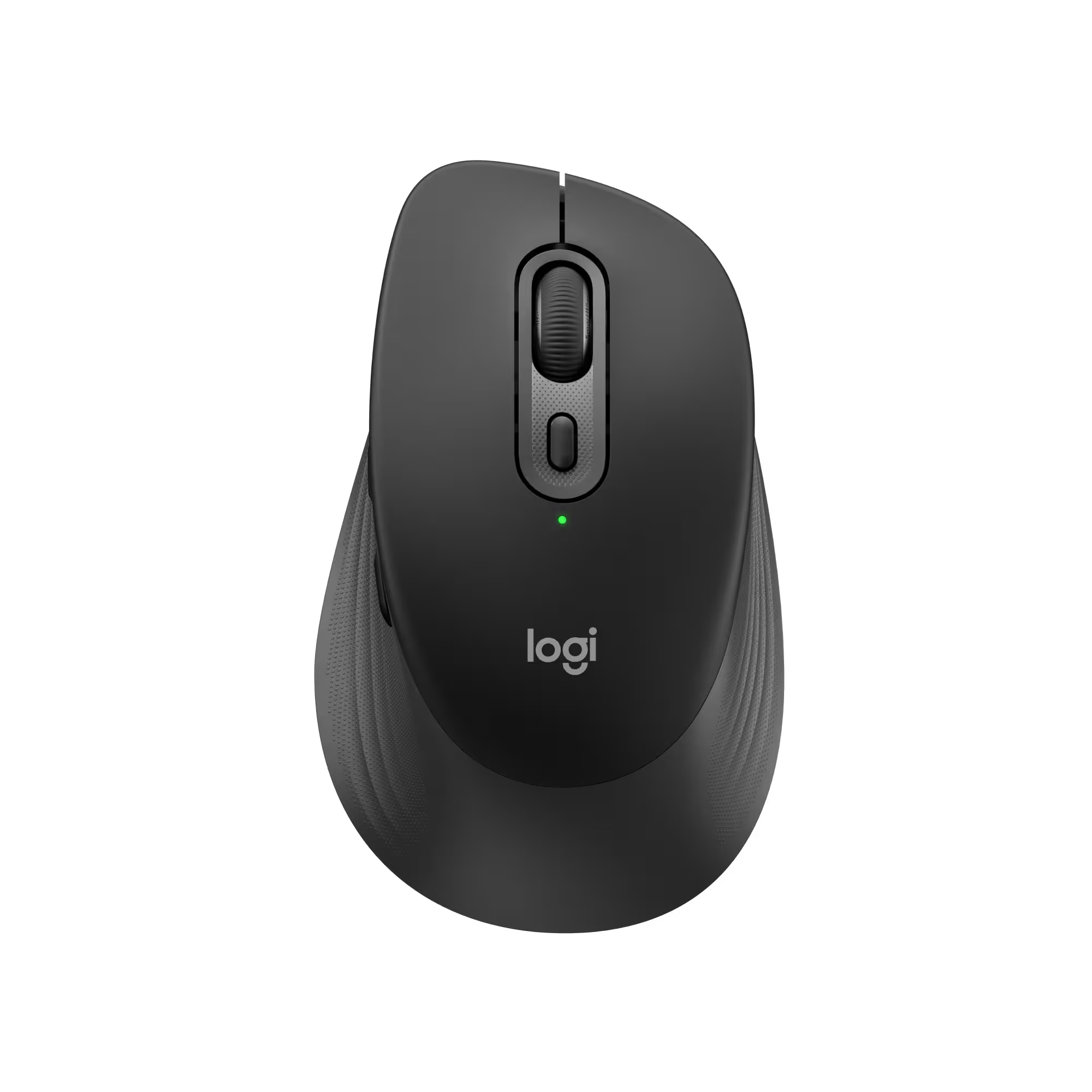
| Product Name | MX Master 4 for Mac - Wireless Laser Ergonomic Mouse with Advanced Performance Haptic Feedback |
| Mouse Type | Standard |
| Lighting Type | None |
| Mouse Operation | Button(s) |
| Mouse Grip Style | Ergonomic |
| Handedness | Right-handed |
| Tracking Method | Laser |
| Maximum Sensitivity | 8000 dots per inch |
| Minimum Sensitivity | 200 dots per inch |
| Number of Buttons (Total) | 8 |
| Number of Thumb Buttons | 3 |
| Number of Programmable Buttons | 8 |
| Adjustable Weight | No |
| Connection Type | Wireless |
| Wireless Connectivity | Radio Frequency (RF - 2.4 Ghz/Low Latency) |
| Maximum Wireless Range | 33 feet |
| Operating System Compatibility | Mac |
| Plug and Play Operation | Yes |
| Number of Devices Connectable Simultaneously | 3 |
| Mouse Power Source | Battery-powered |
| On/Off Switch | Yes |
| Rechargeable Battery (Mouse) | Yes |
| Wireless Charging | No |
| Charging Interface(s) | USB-C |
| Battery Chemistry | Lithium |
| Product Height | 2 inches |
| Product Length | 5.05 inches |
| Product Width | 3.48 inches |
| Product Weight | 150 grams |
| System Requirements | Via Bluetooth® Low Energy (BLE): Windows 11, or later, macOS 13 or later, ChromeOS, Linux, Android 12 or later, iPadOS 15 or later. Via Logi Bolt receiver: available USB port, Windows 11, or later,macOS 13 or later, ChromeOS, Linux |
| Warranty - Parts | 1 year |
| Warranty - Labor | None |
| UPC | 097855205940 | 097855205933 |
No specifications match your search. Try a shorter word, like “port” or “weight”.
this device is very nice. It provides a stimulating and comfortable experience. I recommend it.
I replaced my Logitech Pebble with this, and I am so satisfied that I did. When I got the Pebble, it was planned to be used when I'm traveling with my laptop, even though I have a touchpad. It was always giving me problems just because of the size and because of traveling so much.
This one here, I've been able to use it to replace that one. It's a little stronger. I do keep it in the box when I'm traveling, so it doesn't get damaged. For the most part, I'm using it more when my laptop is plugged into my docking station, and it's really great for that.
The features are awesome, and I love all the controls I have over different aspects. The Logitech software is one of the best. I highly recommend sticking with that Logitech wheelhouse if you're going to be using it and make use of the software to create shortcuts, gestures, everything like that. It really helps.
This is the best mouse mint can buy. Amazing responsive tracking. Fits in the hand perfectly for comfort and awesome productivity. You can set shortcuts for any type of software you use to maximize productivity. I couldn’t be happier. You won’t regret getting this mouse. Nothing else comes close!
This is the best mouse mint can buy. Amazing responsive tracking. Fits in the hand perfectly for comfort and awesome productivity. You can set shortcuts for any type of software you use to maximize productivity. I couldn’t be happier. You won’t regret getting this mouse. Nothing else comes close!
Love this mouse! Moved away from windows laptop to macbook and the keyboard and this mouse has been a boon.
Love this mouse! Moved away from windows laptop to macbook and the keyboard and this mouse has been a boon.
I often do illustrations and have found this mouse to work beautifully. The glide and click feel smooth.
I often do illustrations and have found this mouse to work beautifully. The glide and click feel smooth.
This mouse is just the best, I use it with all my computers!
This mouse is just the best, I use it with all my computers!
Much smoother and improved experience as compared to MX Master 3S.
Much smoother and improved experience as compared to MX Master 3S.
the haptic button gets pressed accidentally, and the cursor feels kind of sluggish on my computers compared to my other mice. I don’t like that i need to install another app, and it kind of struggled to connect. other than that it’s alright
the haptic button gets pressed accidentally, and the cursor feels kind of sluggish on my computers compared to my other mice. I don’t like that i need to install another app, and it kind of struggled to connect. other than that it’s alright
very comfortable to use, only thing i domy like is the batteries are not rechargeable with it
Great product. Helps especially when you use the computer all day long
very comfortable to use, only thing i domy like is the batteries are not rechargeable with it
Great product. Helps especially when you use the computer all day long
Absolutely top of the line mouse. No more hand fatigue, it feels smooth when using and the the buttons have a nice feedback response.
Absolutely top of the line mouse. No more hand fatigue, it feels smooth when using and the the buttons have a nice feedback response.
I’ve been really happy with the Logitech MX Master 4 for Mac so far. The mouse feels premium, comfortable, and very well-built. The fast scroll wheel is one of my favorite features — it makes scrolling through long pages, documents, and websites way smoother and faster than a regular mouse.
I also really like the extra button that opens the quick actions menu. It makes the mouse feel much more useful for productivity because I can access shortcuts quickly without interrupting what I’m doing. The ergonomic shape is comfortable, the tracking feels accurate, and the overall design looks great in White Silver.
Overall, this is a great mouse for Mac users, especially if you spend a lot of time working, browsing, or multitasking. It’s definitely more expensive than a basic mouse, but the features and comfort make it feel worth it.
I’ve been really happy with the Logitech MX Master 4 for Mac so far. The mouse feels premium, comfortable, and very well-built. The fast scroll wheel is one of my favorite features — it makes scrolling through long pages, documents, and websites way smoother and faster than a regular mouse.
I also really like the extra button that opens the quick actions menu. It makes the mouse feel much more useful for productivity because I can access shortcuts quickly without interrupting what I’m doing. The ergonomic shape is comfortable, the tracking feels accurate, and the overall design looks great in White Silver.
Overall, this is a great mouse for Mac users, especially if you spend a lot of time working, browsing, or multitasking. It’s definitely more expensive than a basic mouse, but the features and comfort make it feel worth it.
This mouse is the best I’ve used so far for video editing, I really recommend it if you get stuck in something similar.
This mouse is the best I’ve used so far for video editing, I really recommend it if you get stuck in something similar.
Amazing mouse like all the MX mice. The problem comes from the amount of background usage of the logi software and glitches when using the “rings” in ohotoshop, lightroom or davinci. I disabled and removed all logi+ software and will try as updates come.
Amazing mouse like all the MX mice. The problem comes from the amount of background usage of the logi software and glitches when using the “rings” in ohotoshop, lightroom or davinci. I disabled and removed all logi+ software and will try as updates come.
Great feel and control. Software is a bit bloated but overall works wonderful with Mac.
Great feel and control. Software is a bit bloated but overall works wonderful with Mac.
Love this thing. It does not feel cheap. The vertical and horizontal scroll wheels are snappy and the buttons are placed well and completely programable. You will love this mouse out of the box.
Love this thing. It does not feel cheap. The vertical and horizontal scroll wheels are snappy and the buttons are placed well and completely programable. You will love this mouse out of the box.
Comfortable and very quiet. Exactly what i was looking for
Comfortable and very quiet. Exactly what i was looking for
What an upgrade from S3. This thing is so comfy to hold and just love the durable design and feel
What an upgrade from S3. This thing is so comfy to hold and just love the durable design and feel
It makes my work days easier. Spcecially for getting to multiple tasks with 2 screen
It makes my work days easier. Spcecially for getting to multiple tasks with 2 screen
Smooth and works pretty amazing, connectivity is superfast.
Smooth and works pretty amazing, connectivity is superfast.
I use this mouse for productivity, not gaming, and it has been an excellent replacement for the Apple Magic Mouse, which is still a great option for Mac users. If you want something more ergonomic and much more comfortable in the hand, this is the mouse to try. It makes it easy to scroll through multiple desktops and adds even more functionality with customizable buttons and shortcuts for your favorite apps.
I use this mouse for productivity, not gaming, and it has been an excellent replacement for the Apple Magic Mouse, which is still a great option for Mac users. If you want something more ergonomic and much more comfortable in the hand, this is the mouse to try. It makes it easy to scroll through multiple desktops and adds even more functionality with customizable buttons and shortcuts for your favorite apps.
Great mouse love how how you can customize the buttons
we have had this type of mouse in our office for years. This has some nice improvements. smoother, quiet.
Great mouse love how how you can customize the buttons
we have had this type of mouse in our office for years. This has some nice improvements. smoother, quiet.
Absolutely love this mouse. Easy to use for bitu Windows and Mac. Highly customizable.
Absolutely love this mouse. Easy to use for bitu Windows and Mac. Highly customizable.
Really comfortable in the hands, I love the feel and quality, super solid mouse
Really comfortable in the hands, I love the feel and quality, super solid mouse
This mouse is more comfortable than the Magic Mouse
This mouse is more comfortable than the Magic Mouse
This mouse is amazing, compare to others. Plus for mac users its the best.
This mouse is amazing, compare to others. Plus for mac users its the best.
The Logitech MX Master 4 delivers a noticeable jump in precision and comfort, especially with its new haptic feedback system that makes every action feel more controlled and intentional. The Actions Ring is a standout addition—it puts your most-used tools right under your thumb, which genuinely speeds up creative and productivity workflows. The MagSpeed scroll wheel remains one of the smoothest and most accurate available, and the ergonomic shape makes long work sessions much easier on the hand.
Connectivity is strong and reliable, and the quieter clicks help keep your workspace calm without losing tactile feel. Build quality is solid, and the customization options in Logi Options+ make it easy to tailor the mouse to your exact workflow.
Overall, it’s a premium mouse that justifies its price with performance, comfort, and smart features that make everyday tasks faster and more enjoyable.
Very comfortable to use and easy to navigate. It works both on my IMac and Microsoft desktop computers.
The Logitech MX Master 4 delivers a noticeable jump in precision and comfort, especially with its new haptic feedback system that makes every action feel more controlled and intentional. The Actions Ring is a standout addition—it puts your most-used tools right under your thumb, which genuinely speeds up creative and productivity workflows. The MagSpeed scroll wheel remains one of the smoothest and most accurate available, and the ergonomic shape makes long work sessions much easier on the hand.
Connectivity is strong and reliable, and the quieter clicks help keep your workspace calm without losing tactile feel. Build quality is solid, and the customization options in Logi Options+ make it easy to tailor the mouse to your exact workflow.
Overall, it’s a premium mouse that justifies its price with performance, comfort, and smart features that make everyday tasks faster and more enjoyable.
Very comfortable to use and easy to navigate. It works both on my IMac and Microsoft desktop computers.
Great product, I recommend it to others. I use it on my laptop, it makes my job easy.
Great product, I recommend it to others. I use it on my laptop, it makes my job easy.
Works like a charm and love the gesture controls. Best when used with a mac
Works like a charm and love the gesture controls. Best when used with a mac
Amazing mouse, helped me get use to apples user interface and its multiple functions
Amazing mouse, helped me get use to apples user interface and its multiple functions
It's the best mouse in the market. Period. And now, with the silent buttons is the cherry on the top. Precise, fast and accurate.
It's the best mouse in the market. Period. And now, with the silent buttons is the cherry on the top. Precise, fast and accurate.
Purchased for my son for Xmas for work. He absolutely loves it and says his job is less painful literally. Being 6'6 comes with bigger hands and a regular mouse wasn't cutting it. Making life easier one click at a time☺️
Purchased for my son for Xmas for work. He absolutely loves it and says his job is less painful literally. Being 6'6 comes with bigger hands and a regular mouse wasn't cutting it. Making life easier one click at a time☺️
very easy to easy and comfortable for use for long periods of time.
very easy to easy and comfortable for use for long periods of time.
Every day I go to work and pull this mouse out of my bag and think, “oh yeah…”
Strange reaction. I get it.
Until you’ve held a form fitting mouse with the RIGHT ergonomic feel, the RIGHT weight and movement, the RIGHT haptic response, and the life-changing buttons that are intuitive and not oddly placed (for office not gaming), you might not get it. If you do - you’ll never be the same. For me, it’s like the Birkenstocks of an office mouse.
Every day I go to work and pull this mouse out of my bag and think, “oh yeah…”
Strange reaction. I get it.
Until you’ve held a form fitting mouse with the RIGHT ergonomic feel, the RIGHT weight and movement, the RIGHT haptic response, and the life-changing buttons that are intuitive and not oddly placed (for office not gaming), you might not get it. If you do - you’ll never be the same. For me, it’s like the Birkenstocks of an office mouse.
Best work and day to day mouse created, not much more else to say. Buy it
I’m a little disappointed in this mouse for a couple reasons. First, the 3 has comfortable rubber. The 4 is hard plastic and feels run of the mill. Secondly the IOS version is the exact same price as the Adobe and Windows versions, they are all practically the same, except the iOS version does not come with a type C dongle. Yet it’s the same price.
This mouse is seamless and very easy to install. The setup was quick, and connecting it to 3 different devices was smooth with no issues. Switching between devices works perfectly, and the performance is reliable. Overall, a great mouse for everyday use and multitasking.
Best work and day to day mouse created, not much more else to say. Buy it
I’m a little disappointed in this mouse for a couple reasons. First, the 3 has comfortable rubber. The 4 is hard plastic and feels run of the mill. Secondly the IOS version is the exact same price as the Adobe and Windows versions, they are all practically the same, except the iOS version does not come with a type C dongle. Yet it’s the same price.
This mouse is seamless and very easy to install. The setup was quick, and connecting it to 3 different devices was smooth with no issues. Switching between devices works perfectly, and the performance is reliable. Overall, a great mouse for everyday use and multitasking.
The Logitech MX Master 4 for Mac is incredibly smooth and precise — perfect for creative work and everyday use. The ergonomic design feels great all day, and the customizable buttons and gestures boost productivity. Battery life is impressive, and it pairs seamlessly with Mac devices. A top-tier mouse worth every penny.
The Logitech MX Master 4 for Mac is incredibly smooth and precise — perfect for creative work and everyday use. The ergonomic design feels great all day, and the customizable buttons and gestures boost productivity. Battery life is impressive, and it pairs seamlessly with Mac devices. A top-tier mouse worth every penny.
Great mouse for Mac. It glides very easily. You can assign buttons to different functions or apps. It integrates with AI services well with one click.
Great mouse for Mac. It glides very easily. You can assign buttons to different functions or apps. It integrates with AI services well with one click.
Really easy set up, great comfort and performance. Looking forward to figuring out how to maximize my productivity with all the options it offers
Really easy set up, great comfort and performance. Looking forward to figuring out how to maximize my productivity with all the options it offers
I'm a huge fan of Logitech Mice and I was using the MX Master 3 for the last few years. When it was time to get a new mouse, I only considered the newest MX Master 4 for Mac.
The MX Master mice has, for me, the best ergonomics of any mouse I've ever used. They feel great in your hand, and the customization options are awesome. In particular, the newly released 4 is a major upgrade over the 3 I was using. the materials feel higher quality. There are more customization options, including a haptic feedback button, with multiple options for controlling an application when pressed.
Using the Logi Options Application, you have the ability to control so many features on the mouse, for pointer speed to scroll speed, to volume and many other other options.
The battery is rechargeable and a single charge whould last about 70 days, which is awesome. And just a couple minutes plugged in will give you a few hours use. You can also use the mouse while it's plugged in to charge.
With the MX Master 4, Logitech took everything that was great about the previous generations and made it even better, which is no easy feat. But they did it and I can't recommend this mouse enough!
I'm a huge fan of Logitech Mice and I was using the MX Master 3 for the last few years. When it was time to get a new mouse, I only considered the newest MX Master 4 for Mac.
The MX Master mice has, for me, the best ergonomics of any mouse I've ever used. They feel great in your hand, and the customization options are awesome. In particular, the newly released 4 is a major upgrade over the 3 I was using. the materials feel higher quality. There are more customization options, including a haptic feedback button, with multiple options for controlling an application when pressed.
Using the Logi Options Application, you have the ability to control so many features on the mouse, for pointer speed to scroll speed, to volume and many other other options.
The battery is rechargeable and a single charge whould last about 70 days, which is awesome. And just a couple minutes plugged in will give you a few hours use. You can also use the mouse while it's plugged in to charge.
With the MX Master 4, Logitech took everything that was great about the previous generations and made it even better, which is no easy feat. But they did it and I can't recommend this mouse enough!
Works excellent in Mac and windows, The features are great!
Awesome mouse, upgraded from previous model. Feels premium and this one is so smooth! Highly recommend.
Works excellent in Mac and windows, The features are great!
Awesome mouse, upgraded from previous model. Feels premium and this one is so smooth! Highly recommend.
Nice upgrade from OG mx master. The haptic feedback is a nice touch
Nice upgrade from OG mx master. The haptic feedback is a nice touch
Excellent mouse, easy to set up, very responsive. Would recommend.
Excellent mouse, easy to set up, very responsive. Would recommend.
Great item! nice improvement from MX 3...feels much better in the hand. A little lag occasionally. Overall really good. hope it lasts longer than my MX 3 which died after about 2-3 years of heavy use
Great item! nice improvement from MX 3...feels much better in the hand. A little lag occasionally. Overall really good. hope it lasts longer than my MX 3 which died after about 2-3 years of heavy use
Its the bees knees. All of the extra functions are so useful
Its the bees knees. All of the extra functions are so useful
Plus an extra button! I like the haptic feedback as well.
Plus an extra button! I like the haptic feedback as well.
I owned MXM3 for Mac; didn't own the Pro, but now with this 4, I couldn't be happier. The grip is more smooth with little to no chance of discoloration. more options for customization meanwhile maintain it's core shape and value.
I owned MXM3 for Mac; didn't own the Pro, but now with this 4, I couldn't be happier. The grip is more smooth with little to no chance of discoloration. more options for customization meanwhile maintain it's core shape and value.
No reviews match these filters.
Ask about features, fit or compatibility and our team will answer.
The full manufacturer warranty is available on request before purchase — call (888) 915-4820 or email [email protected].
Extend protection plans: optional 2- or 3-year coverage, added as a separate cart line. Plan details
Contents vary by model. Call (888) 915-4820 and we’ll confirm before you order.
New, sealed US retail unit. Sold & shipped by AZ Discount USA.
Ships in 1–2 business days from our Scottsdale, AZ-area warehouse
No restocking fees. We email a prepaid label.
Found it lower at a qualifying US retailer? We’ll match it.
Optional 2- and 3-year plans on eligible products.
Shop by department
Help & account
Brands A–Z Track order Start a return Help center (888) 915-4820Open now · until 6 PM MSTAppliances
Computers & Tablets
Video Games
Car Electronics & GPS
Audio
TV & Home Theater
Outdoor Living
Toys, Games & Crafts
Home, Furniture & Office
Cameras, Camcorders & Drones
Smart Home
Headphones
Health, Wellness & Personal Care
Fitness, Sports & Outdoors
Electric Transportation