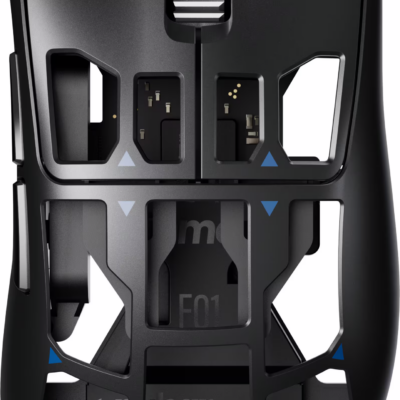
Precision you can feel with the Haptic Sense Panel
Customizable haptic feedback on specific actions, shortcuts, notifications enhancing productivity on this wireless Bluetooth mouse.¹
Effortlessly access favorite tools with Actions Ring on this MX Series mouse
A dynamic, customizable overlay adapts to each app, placing most used filters, adjustments, and shortcuts at your cursor.
Ultra-fast scrolling
Scroll 1,000 lines per second and stop on a pixel with the MagSpeed scroll wheel—Logitech’s fastest, quietest, and most precise scrolling experience.
More powerful connectivity
Enjoy 2X more powerful connectivity with a USB-C dongle, advanced radio chip, and optimized antenna for faster, stronger, reliable performance—or use Bluetooth for more versatility.²
Ergonomic mouse designed for comfort
MX Master 4 keeps you in flow with a natural tilt, intuitive buttons, and a thumb scroll wheel that reduces hand stress for fluid navigation.
Quiet Clicks
Quiet Clicks on MX Master 4 reduce noise and distractions, offering a soft, satisfying feel with 90% less click noise—perfect for focused workflows.³
MX + Adobe Creative Cloud
Get a complimentary 2-month Adobe Creative Cloud subscription with your purchase of MX Master 4 - Black, exclusively at Best Buy.
Designed for a positive future
Plastic parts include recycled plastic - 54% Black; 48% Pale Grey; 100% recycled cobalt in the battery; built to last with improved stain resistance.⁴
2-months of Adobe Creative Cloud on us
Pair two of the world’s top creative tools. Buy one MX Master 4 Adobe Version and claim your free 2-month Adobe Creative Cloud membership. *Value calculated based on Adobe Creative Cloud All Apps monthly value of $59.99 valid on Adobe.com on Sept 12, 2024. Terms & Conditions apply.¹ ² ³
¹ Terms and Conditions: Offer starts on October 2024, and expires on October 31st, 2026. Offer available worldwide to customers who purchase the Logitech MX Master 4 who are new or existing Adobe customers. When you purchase an MX Master 4 you receive a complimentary 2-month membership of Adobe Creative Cloud All apps when you go to logi.com/adobe-offer offer page and follow the redemption steps.
² Limit: 1 subscribing customer per product. At the end of the trial period, if you provided a payment method, your subscription would automatically renew, and you will be charged the then-current subscription rate unless you elect to change or cancel your subscription.For Creative Cloud All apps, the current subscription rate is US$89.99/mo or US$659.88/yr (annual, prepaid) (plus applicable taxes/VAT/GST).Cancellations can be made through Customer Support or https://account.adobe.com/plans
³ Valid only for eligible persons who are 18+. Residents or persons in embargoed countries or countries subject to U.S. or local export restrictions are not eligible. Offer and prices are subject to change. Offer may not be assigned, exchanged, sold, transferred, combined, or redeemed for cash or other goods and services not expressly stated here as included. Subject to availability where the recipient resides. Additional terms may apply. VOID WHERE PROHIBITED OR RESTRICTED BY LAW.
⁴ The purchase of an MX Master 4 includes 2 months of Adobe Creative Cloud All Apps membership. Terms and conditions apply.
⁵ Requires Logi Options+ app, available for recent versions of Windows and macOS
⁶ Battery life may vary based on user and computing conditions
Feel precision with native haptics on Windows 11 and MX Master 4
Unlock enhanced control and precision in PowerPoint and other compatible apps with native haptic support for Windows 11
Specifications
Details 36
Brand
Logitech
Model Number
910-007561
Product Name
MX Master 4 - Black Adobe Edition - Wireless Laser Ergonomic Mouse with Advanced Performance Haptic Feedback
Color
Black
Mouse Type
Standard
Lighting Type
None
Mouse Operation
Button(s)
Mouse Grip Style
Ergonomic
Handedness
Right-handed
Tracking Method
Laser
Maximum Sensitivity
8000 dots per inch
Minimum Sensitivity
200 dots per inch
Number of Buttons (Total)
8
Number of Thumb Buttons
3
Number of Programmable Buttons
8
Adjustable Weight
No
Connection Type
Wireless
Wireless Connectivity
Radio Frequency (RF - 2.4 Ghz/Low Latency)
Maximum Wireless Range
33 feet
Operating System Compatibility
Windows
Plug and Play Operation
Yes
Number of Devices Connectable Simultaneously
3
Mouse Power Source
Battery-powered
On/Off Switch
Yes
Rechargeable Battery (Mouse)
Yes
Wireless Charging
No
Charging Interface(s)
USB-C
Battery Chemistry
Lithium
Product Height
2 inches
Product Length
5.05 inches
Product Width
3.48 inches
Product Weight
150 grams
System Requirements
Via Bluetooth® Low Energy (BLE): Windows 11, or later, macOS 13 or later, ChromeOS, Linux, Android 12 or later, iPadOS 15 or later. Via Logi Bolt receiver: available USB port, Windows 11, or later,macOS 13 or later, ChromeOS, Linux
Warranty - Parts
1 year
Warranty - Labor
None
UPC
097855207609
No specifications match your search. Try a shorter word, like “port” or “weight”.
Customer reviews
4.7
71 ratings 92% rated 4 stars or higher
JBerky1
Rated 3 out of 5Sep 26, 2026
I love the feel of the mouse, the weight, and the click is very satisfying. I find it to be very accurate and comfortable. But my scroll wheel has already broken after 4 months.
Helpful?
Josh
Rated 5 out of 5Sep 26, 2026
If you spend any portion of your day in Excel or navigating large documents, this mouse is a luxury worth more than a morning cup of coffee. Feels premium. Looks premium. Executes.
Helpful?
Mrrrt
Rated 5 out of 5Sep 25, 2026
I had the original mx master for years, and still worked just fine. However, I wanted the updated charging port and the extras that you could assign to the mouse itself as well. Comfort is great as always, and the assignable options for Mac are very usable. All in all, a great upgrade.
Helpful?
ADMIRK
Rated 5 out of 5Sep 25, 2026
Amazing product. I had all MX series and this one is the best one.
Helpful?
MIKEM
Rated 5 out of 5Sep 20, 2026
It took me a bit to get used to all of the different ways this mouse can be used but I am getting the hang of it and I can say it gets the job done. I am using this with my mac mini, magic keyboard and trackpad. I have everything covered to help increase production in my studio. One of the best on the market!!!
Helpful?
CARRIEVVerified purchase
Rated 5 out of 5Sep 15, 2026
I love the haptic feedback, the fact that I can switch my controls automatically when I open a specific program. My excel is set up for scrolling left to right, which is SO useful, has functions programmed, adobe and PowerPoint are more of the same. But I can go from one program to another and it just knows to switch my settings! Best Mouse EVER! Every paralegal needs one!!
Helpful?
CARRIEV
Rated 5 out of 5Sep 15, 2026
I love the haptic feedback, the fact that I can switch my controls automatically when I open a specific program. My excel is set up for scrolling left to right, which is SO useful, has functions programmed, adobe and PowerPoint are more of the same. But I can go from one program to another and it just knows to switch my settings! Best Mouse EVER! Every paralegal needs one!!
Helpful?
JONGVerified purchase
Rated 5 out of 5Sep 14, 2026
Awesomeness and the best part is that you can see the whole world from the outside looking in and out
Helpful?
JONG
Rated 5 out of 5Sep 14, 2026
Awesomeness and the best part is that you can see the whole world from the outside looking in and out
Helpful?
JayDVerified purchase
Rated 1 out of 5Sep 11, 2026
Extremely Disappointing Experience with Best Buy
I visited Best Buy during their 60th anniversary promotion after receiving an email advertising a $100 gift card for $60. I drove for an hour to the store specifically because of this promotion, only to find that there were absolutely no meaningful deals available. It felt like a marketing gimmick that brought customers into the store without offering what was advertised.
Despite that, I still decided to purchase an expensive mouse for around $150. Unfortunately, the store associate did not explain the return policy to me at the time of purchase.
Once I started using the mouse for gaming, I experienced significant lagging and performance issues. Since I live an hour away, I contacted Best Buy customer service through online chat hoping they could help resolve the issue without requiring another long drive. Instead, I spent nearly two hours chatting with customer service, only to receive no meaningful help. In the end, I was simply told that I would have to drive another hour back to the store to return the product.
This entire experience has been extremely frustrating—from the misleading-feeling promotion, to the lack of communication about the return policy, to the poor customer service afterward.
After this experience, I have no intention of shopping at or visiting Best Buy again. I would strongly recommend that customers think twice before making a purchase, especially if they live far from the store.
Very disappointing experience. Best Buy has permanently lost my business. Waste of time, money and energy! Avoid at all costs !
Helpful?
SamueLLVerified purchase
Rated 5 out of 5Sep 11, 2026
Had the MX Master series for several years now. This new one is the best of them all and super high quality with a great build. Only complaint is that the click is softer than the MX Master 3; not too bad though.
Helpful?
TylerKVerified purchase
Rated 5 out of 5Sep 11, 2026
The Logitech MX Master 4 Adobe Edition is hands-down the best performance mouse I’ve ever used. The ergonomic shape fits my hand comfortably for long work sessions, reducing wrist strain significantly. The tactile feedback and ultra-fast scrolling make navigating timeline-heavy creative apps smooth and precise. Button customization via Logi software is seamless, and tracking on any surface works flawlessly. Highly recommend it to anyone looking to boost their productivity!
Helpful?
JayD
Rated 1 out of 5Sep 11, 2026
Extremely Disappointing Experience with Best Buy
I visited Best Buy during their 60th anniversary promotion after receiving an email advertising a $100 gift card for $60. I drove for an hour to the store specifically because of this promotion, only to find that there were absolutely no meaningful deals available. It felt like a marketing gimmick that brought customers into the store without offering what was advertised.
Despite that, I still decided to purchase an expensive mouse for around $150. Unfortunately, the store associate did not explain the return policy to me at the time of purchase.
Once I started using the mouse for gaming, I experienced significant lagging and performance issues. Since I live an hour away, I contacted Best Buy customer service through online chat hoping they could help resolve the issue without requiring another long drive. Instead, I spent nearly two hours chatting with customer service, only to receive no meaningful help. In the end, I was simply told that I would have to drive another hour back to the store to return the product.
This entire experience has been extremely frustrating—from the misleading-feeling promotion, to the lack of communication about the return policy, to the poor customer service afterward.
After this experience, I have no intention of shopping at or visiting Best Buy again. I would strongly recommend that customers think twice before making a purchase, especially if they live far from the store.
Very disappointing experience. Best Buy has permanently lost my business. Waste of time, money and energy! Avoid at all costs !
Helpful?
SamueLL
Rated 5 out of 5Sep 11, 2026
Had the MX Master series for several years now. This new one is the best of them all and super high quality with a great build. Only complaint is that the click is softer than the MX Master 3; not too bad though.
Helpful?
TylerK
Rated 5 out of 5Sep 11, 2026
The Logitech MX Master 4 Adobe Edition is hands-down the best performance mouse I’ve ever used. The ergonomic shape fits my hand comfortably for long work sessions, reducing wrist strain significantly. The tactile feedback and ultra-fast scrolling make navigating timeline-heavy creative apps smooth and precise. Button customization via Logi software is seamless, and tracking on any surface works flawlessly. Highly recommend it to anyone looking to boost their productivity!
Helpful?
LancelotVerified purchase
Rated 5 out of 5Sep 7, 2026
Needed a mouse to go with my MX mechanical Mini and this was the perfect match. Love the feel and build of the mouse. Its more mouse than I need but looks great on my desk. I use it for everyday tasks such as emails, web browsing and paying bills online. Seems to have a long run time between charges, been a week and still on 100% battery. Great mouse and a great buy.
Helpful?
Lancelot
Rated 5 out of 5Sep 7, 2026
Needed a mouse to go with my MX mechanical Mini and this was the perfect match. Love the feel and build of the mouse. Its more mouse than I need but looks great on my desk. I use it for everyday tasks such as emails, web browsing and paying bills online. Seems to have a long run time between charges, been a week and still on 100% battery. Great mouse and a great buy.
Helpful?
JACOBGVerified purchase
Rated 5 out of 5Sep 6, 2026
This is pretty much the only mouse aside from the magic mouse/trackpad that I would ever use for mac. It is my first time getting into the master series and this was a great purchase. Clicks have great feedback but are silent, the haptic motor felt a bit gimmicky at first, but after using it, i think it adds great feedback when in hand. Battery life is insane, honestly insane, I have had it for a few months now and still havent plugged it in to charge. I dont use it every day, but when I do it is typically on for 8 hours or so, ZERO issues thus far. Love it, highly recommend.
Helpful?
JACOBG
Rated 5 out of 5Sep 6, 2026
This is pretty much the only mouse aside from the magic mouse/trackpad that I would ever use for mac. It is my first time getting into the master series and this was a great purchase. Clicks have great feedback but are silent, the haptic motor felt a bit gimmicky at first, but after using it, i think it adds great feedback when in hand. Battery life is insane, honestly insane, I have had it for a few months now and still havent plugged it in to charge. I dont use it every day, but when I do it is typically on for 8 hours or so, ZERO issues thus far. Love it, highly recommend.
Helpful?
thewaggonerVerified purchase
Rated 5 out of 5Sep 4, 2026
As a long time MX Master 3 user, I was initially skeptical of the Master 4. However, I have found it to be a delight to use. The altered shape takes a day or so to get used to but now I prefer it over the old contour. Logi Options also opens up a lot more areas for customization that I have enjoyed tweaking. The haptics are a nice addition as well, giving subtle feedback that just feels good. My only complaint is that I think the positioning of the horizontal scroll wheel is slightly more awkward for my hands. I don't have small hands and yet it feels awkward to engage with at times. Overall highly recommend this, especially if you are coming from the Master 3 and it was beginning to die on you like mine was
Helpful?
thewaggoner
Rated 5 out of 5Sep 4, 2026
As a long time MX Master 3 user, I was initially skeptical of the Master 4. However, I have found it to be a delight to use. The altered shape takes a day or so to get used to but now I prefer it over the old contour. Logi Options also opens up a lot more areas for customization that I have enjoyed tweaking. The haptics are a nice addition as well, giving subtle feedback that just feels good. My only complaint is that I think the positioning of the horizontal scroll wheel is slightly more awkward for my hands. I don't have small hands and yet it feels awkward to engage with at times. Overall highly recommend this, especially if you are coming from the Master 3 and it was beginning to die on you like mine was
Helpful?
SaniYVerified purchase
Rated 5 out of 5Sep 2, 2026
Very smooth and quiet and easy to work with for hours!
Helpful?
SaniY
Rated 5 out of 5Sep 2, 2026
Very smooth and quiet and easy to work with for hours!
Helpful?
JESUSMTVerified purchase
Rated 5 out of 5Aug 31, 2026
I’ve been using the MX Master 4 Adobe Edition for a few weeks now, and it’s honestly one of the best mice I’ve ever used. The ergonomic shape is super comfortable, especially for long work sessions, and the new haptic feedback feels really clean and precise — not gimmicky at all.
What I love most is how smooth and accurate the tracking is. I work in Photoshop and Premiere almost every day, and the Adobe‑specific features actually make a difference. The scroll wheel is buttery smooth, and switching between modes feels instant.
Battery life is great too. I charge it once and it lasts days, even with heavy use. And no, it doesn’t come with a cable, but any regular USB‑C cable works fine.
Build quality feels premium, and the mouse has a nice weight to it — not too heavy, not too light. Overall, it’s fast, comfortable, and makes my workflow noticeably smoother.
If you’re doing creative work or just want a top-tier mouse, this one is absolutely worth it.
Helpful?
JESUSMT
Rated 5 out of 5Aug 31, 2026
I’ve been using the MX Master 4 Adobe Edition for a few weeks now, and it’s honestly one of the best mice I’ve ever used. The ergonomic shape is super comfortable, especially for long work sessions, and the new haptic feedback feels really clean and precise — not gimmicky at all.
What I love most is how smooth and accurate the tracking is. I work in Photoshop and Premiere almost every day, and the Adobe‑specific features actually make a difference. The scroll wheel is buttery smooth, and switching between modes feels instant.
Battery life is great too. I charge it once and it lasts days, even with heavy use. And no, it doesn’t come with a cable, but any regular USB‑C cable works fine.
Build quality feels premium, and the mouse has a nice weight to it — not too heavy, not too light. Overall, it’s fast, comfortable, and makes my workflow noticeably smoother.
If you’re doing creative work or just want a top-tier mouse, this one is absolutely worth it.
Helpful?
RyanVerified purchase
Rated 5 out of 5Aug 31, 2026
Best Mouse You Can Buy! Always works, holds long charge, and is very comfortable to use for long periods of time.
Helpful?
Ryan
Rated 5 out of 5Aug 31, 2026
Best Mouse You Can Buy! Always works, holds long charge, and is very comfortable to use for long periods of time.
Helpful?
Reaper5401Verified purchase
Rated 4 out of 5Aug 28, 2026
This was an upgrade from the original MX mouse. The MX mouse was perfect for what I do (mostly being able to scroll left and right in a spreadsheet, drawings, etc...), The shape was almost perfect and the side scroll wheel was perfectly placed. however after 10 years, it started falling apart and I had to replace it. Overall I am happy with the MX4, but the shape is taller and it is taking time for me to get used to it, I also find the side scroll wheel is higher than I would like (I guess in time I will adjust to it). Additionally since I use the mouse on my work computer, I am unable to use any of the nice software functions, and finally, I wish the battery indicator on my original MX was still on the MX4, I liked the three LED bar so I could get a rough idea of battery life at a glance. But for all my dislikes, this is a solid mouse and nothing else rally comes close.
Helpful?
Rasco213Verified purchase
Rated 5 out of 5Aug 28, 2026
I can easily review documents and swap applications from a touch of a button. Type C adapter and Bluetooth connectivity.
Helpful?
Reaper5401
Rated 4 out of 5Aug 28, 2026
This was an upgrade from the original MX mouse. The MX mouse was perfect for what I do (mostly being able to scroll left and right in a spreadsheet, drawings, etc...), The shape was almost perfect and the side scroll wheel was perfectly placed. however after 10 years, it started falling apart and I had to replace it. Overall I am happy with the MX4, but the shape is taller and it is taking time for me to get used to it, I also find the side scroll wheel is higher than I would like (I guess in time I will adjust to it). Additionally since I use the mouse on my work computer, I am unable to use any of the nice software functions, and finally, I wish the battery indicator on my original MX was still on the MX4, I liked the three LED bar so I could get a rough idea of battery life at a glance. But for all my dislikes, this is a solid mouse and nothing else rally comes close.
Helpful?
Rasco213
Rated 5 out of 5Aug 28, 2026
I can easily review documents and swap applications from a touch of a button. Type C adapter and Bluetooth connectivity.
Helpful?
JORDANVerified purchase
Rated 5 out of 5Aug 24, 2026
The haptic has now become a necessity. Will it change your life? No but it’s hard to go back to a mouse without it.
Helpful?
JORDAN
Rated 5 out of 5Aug 24, 2026
The haptic has now become a necessity. Will it change your life? No but it’s hard to go back to a mouse without it.
Helpful?
WILLIAMEVerified purchase
Rated 5 out of 5Aug 23, 2026
The mouse is perfect to work a lot of hours, work fast and make the job more fast
Helpful?
WILLIAME
Rated 5 out of 5Aug 23, 2026
The mouse is perfect to work a lot of hours, work fast and make the job more fast
Helpful?
AnilVerified purchase
Rated 5 out of 5Aug 22, 2026
This is one of the best and comfortable mouse. Besides all the general applications, this mouse works best with the CAD tools!
Helpful?
CustomerVerified purchase
Rated 2 out of 5Aug 22, 2026
I often pick my mouse up for longer movements but on this version when I do that I presses the button that brings up the ring
Helpful?
Anil
Rated 5 out of 5Aug 22, 2026
This is one of the best and comfortable mouse. Besides all the general applications, this mouse works best with the CAD tools!
Helpful?
BillVerified purchase
Rated 4 out of 5Aug 21, 2026
1) Moving the mouse once wakes up the mouse - not the monitor. Moving the mouse twice wakes up the monitor! Major inconvenience since I do that literally every time I sit down. 2) The scroll wheel seems to go crazy up and crazy down only sometimes by barely touching it. If you try to do it on purpose, it won't happen easily. I do not understand that, but maybe it is my fault - I cannot tell yet. Either way, it is not intuitive. 3) Google AI and the forums are wrong that the Adobe Edition comes with Adobe presets. I didn't notice any, and it's impossible, because the mouse itself does not store configuration settings or any other data. All data is stored on the PC by the software program. You can configure the Adobe settings manually the same as you would for the Standard Edition. The only difference that I can tell with the Adobe Edition is there is a 2-month free trial with some Adobe software. That's not why I bought the mouse. Other than the free trial, it is exactly the same as the Standard or Business Edition. Also the Adobe Edition is blacker, which I prefer over charcoal. The positives is the clicking is no noise and like a cushion and it moves easily even on glass. It is expensive, so stack the discounts! If you are on a computer all day, it is worth it.
Helpful?
dlinaresVerified purchase
Rated 5 out of 5Aug 21, 2026
I really like the feel and enhancements it provides.
Helpful?
GoodPcVerified purchase
Rated 5 out of 5Aug 21, 2026
I love all the features that it has, and how configurable it is.
Helpful?
AravindVVerified purchase
Rated 5 out of 5Aug 19, 2026
If you’re using MX Master 3 or a lower version, this is an incredible upgrade. However, if you already have MX Master 3s, you can skip this upgrade and won’t notice much of a difference, aside from the AI workflow.
Helpful?
MOSESPVerified purchase
Rated 4 out of 5Aug 16, 2026
Mouse is very ergonomic and the scrolling it so smooth. A need for anyone who uses a mouse a lot.
Helpful?
TashVerified purchase
Rated 5 out of 5Aug 16, 2026
It was finally time for me to invest in an ergonomic mouse and I'm very happy with this purchase. It is very easy to set up and I liked how the setup was demonstrated. I appreciate the different customization options that are available and also love how there's some pre-made add-on features that I can incorporate in my desired mouse set up. I like how there is a bluetooth and usbc connection option and that I can easily switch between computers or monitors if needed. I would highly recommend this mouse for anyone who wants a better experience doing digital tasks.
Helpful?
KARANVerified purchase
Rated 3 out of 5Aug 14, 2026
Excellent quality. New smart action ring haptic button reduces keyboard use. Cannot use with left hand
Helpful?
BrettMVerified purchase
Rated 4 out of 5Aug 14, 2026
This mouse has been comfortable to use day to day and feels well made. The ergonomic shape is easy on my hand and the buttons feel responsive. It's worked reliably without any issues so far. It may not be the least expensive option, but the build quality feels worth it for regular use.
Helpful?
WabaEliteVerified purchase
Rated 5 out of 5Aug 14, 2026
This thing is so good, the haptic feedback and slightly modified sizing, its a 10/10
Helpful?
JaredVerified purchase
Rated 5 out of 5Aug 14, 2026
Got this as an upgrade to my work station. It's overall performance is excellent! Logitech made some good improvements with the MX Master 4.
Helpful?
MattdaddyVerified purchase
Rated 5 out of 5Aug 14, 2026
Love all the features! Instant access to AI, etc. Also, I had the MX3 before & this is MUCH BETTER build quality!
Helpful?
ABELHVerified purchase
Rated 5 out of 5Aug 14, 2026
I’ve been really happy with the Logitech MX Master wireless mouse. It feels comfortable in my hand, works smoothly, and the scrolling is very responsive. I especially like how well it handles during long hours of work. The battery life is great, and the wireless connection has been reliable. Overall, it’s a solid and comfortable mouse that I would definitely recommend for everyday use.
Helpful?
FcchelseaVerified purchase
Rated 5 out of 5Aug 14, 2026
Great mouse. Good ergonomics. Smooth. Connected fast to computer
Helpful?
MARCOSCVerified purchase
Rated 5 out of 5Aug 7, 2026
This mouse allows me to switch multiple computers. I love that.
Helpful?
YARELYGVerified purchase
Rated 5 out of 5Aug 7, 2026
The mouse makes for a seamless experience, it’s very easy to use and works perfectly
Helpful?
CALEBVerified purchase
Rated 5 out of 5Aug 7, 2026
I have throughly enjoyed my experience with the mx master 4 thus far. The ergonomic feel of the mouse is unmatched and allows my wrist not to hurt. Additionally I love the added haptic button. I didn’t think that I would use it as much as I do. Overall, this is an amazing mouse that I would highly recommend to anyone doing office work. Everyday I am excited to use it.
Helpful?
ANDRENVerified purchase
Rated 5 out of 5Aug 7, 2026
Such an awesome mouse, very versatile and ergonomic. I would definitely recommend
Helpful?
CharlesAVerified purchase
Rated 5 out of 5Jul 31, 2026
good ergonomics, lots of function (most of which I don't use), significant battery life.
Helpful?
Bruindude2Verified purchase
Rated 5 out of 5Jul 30, 2026
Love the heptics and all the features, and as always, Logitech makes an absolutely rock-solid built mouse into the best business solution out there.
Helpful?
SERGIOVerified purchase
Rated 5 out of 5Jul 30, 2026
Definitely feels great for long periods of use for work, a little heavy but great.
Helpful?
suhthedetectiveVerified purchase
Rated 5 out of 5Jul 27, 2026
I have relied on Logitech’s MX mice for nearly seven years, beginning with the MX Anywhere 2 Wireless in 2016 and moving to the MX Master 3 in 2021. Both proved exceptionally reliable, comfortable, and durable through years of daily use, which gave me high expectations for the MX Master 4. I am pleased to say that it continues that tradition while feeling like a genuine refinement rather than an unnecessary redesign.
The MX Master 4 delivers excellent precision, smooth scrolling, responsive controls, and outstanding comfort during long work sessions. Haptic feedback adds a satisfying sense of interaction without becoming distracting, and the ergonomic design makes navigating documents, creative applications, multiple windows, and everyday tasks feel effortless. After such positive experiences with the MX Anywhere 2 and MX Master 3, I am thoroughly satisfied with this upgrade and confident that it will remain a dependable part of my setup for years.
Helpful?
SamsungFamilyHUBVerified purchase
Rated 5 out of 5Jul 24, 2026
Excellent Mouse and Smooth while scrolling and it works on all surfaces.
Helpful?
LYNNETTEJVerified purchase
Rated 5 out of 5Jul 24, 2026
Love this product and would highly recommend it for folks who spend a lot of time on their computers jumping from multiple projects frequently
Helpful?
CyrilAVerified purchase
Rated 1 out of 5Jul 24, 2026
I had high expectations for the Logitech MX Master 4 because of its premium features and ergonomic design. While the build quality, tracking, and customizable buttons are excellent, I found it less comfortable than my older Logitech M720 Triathlon. The MX Master 4 feels larger and heavier, and the thumb rest didn't fit my hand as naturally as the M720. After extended use, it caused more hand fatigue than I expected. Overall, it's a high-quality mouse with great performance, but comfort is very personal. If you're already comfortable with the M720 Triathlon, I recommend trying the MX Master 4 in person before purchasing to make sure it fits your hand and grip style.
Helpful?
CODYCVerified purchase
Rated 5 out of 5Jul 24, 2026
I’m on a lot of spreadsheets all day. The ergonomics are comfortable. The product feels quality. The battery life is great. I remapped the side buttons so I don’t need to reach for my keyboard hardly at all anymore and I love the side scrolling wheel
Helpful?
ALDORVerified purchase
Rated 5 out of 5Jul 23, 2026
Very comfortable and easy to move around when in use.
Helpful?
JoeyBVerified purchase
Rated 5 out of 5Jul 18, 2026
Ever since I have found the MX series, I have not used anything else. I LOVE this wireless device! It is very comfortable to use for a long day at work or otherwise. Logitech really did a great job here & each iteration seems to get better and better. This mouse is highly customizable as they have nudged in more and more options into the design to make it easier and more efficient to use. I also appreciate the different ways it can connect, using the dongle or via Bluetooth, as well as being able to be used with multiple computers with the quick push of a button. I would HIGHLY recommend this product to anyone needing a wireless mouse!
Helpful?
MalSVerified purchase
Rated 5 out of 5Jul 16, 2026
I’ve been a fan of Logitech’s MX Master line for years —When I saw the newest version with “Ultra‑Fast Scrolling” and haptic feedback, I decided to treat myself. It was absolutely worth it.
Helpful?
WesleyVerified purchase
Rated 5 out of 5Jul 16, 2026
You can use the mouse on any surface and it feels amazing and very nicely fits around your hand and is very quiet. Has ton of buttons and the best feature, the haptic feedback. To explain what that is it’s a button that you press on the side of the mouse and it brings up a wheel full of shortcuts that make browsing and work so much easier.
Helpful?
BanditVerified purchase
Rated 5 out of 5Jul 10, 2026
Logitech - MX Master 4 has great build quality, my wife loves the side scroll in her data work, and the shortcuts. It is a bit heavy for her as she lifts her mouse during her workflow.
Helpful?
HoldenLVerified purchase
Rated 5 out of 5Jul 8, 2026
The only way I can edit is with this mouse. Mapable buttons speed up any workflow. Battery life is amazing. Must have.
Helpful?
ISAIAHLVerified purchase
Rated 5 out of 5Jul 6, 2026
works so well for me and you can even control it in your settings
Helpful?
JESSICAVerified purchase
Rated 5 out of 5Jul 4, 2026
Love the new features of this. My master 3 stopped working and this was a great upgrade.
Helpful?
No reviews match these filters.
Questions & answers
No questions yet
Ask about features, fit or compatibility and our team will answer.