LUVIEF
Verified purchase
Rated 5 out of 5Jul 3, 2026
This is a great device to increase scope of network inside the home
Helpful?

Backed by Extend & AZ Discount USA. Transferable if gifted; cancel anytime for a prorated refund. Full terms
| Brand | ASUS |
|---|---|
| Model Number | EBP15 |
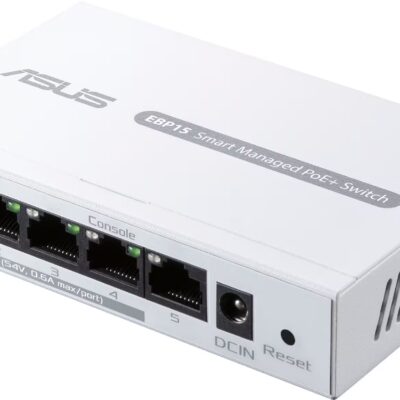
| Product Name | ExpertWiFi EBP15 5-Port Gigabit Smart Managed PoE+ Ethernet Switch |
| Color | White |
| Number of PoE (Power over Ethernet) Ports | 4 |
| Switch Management Type | Smart managed |
| Number of LAN Ports | 5 |
| Quality Of Service (QoS) Traffic Prioritization | Yes |
| Ethernet Standard | 10/100/1000 |
| ENERGY STAR Certified | No |
| Gigabit Ethernet Speed | Yes |
| Product Height | 1.02 inches |
| Product Length | 2.95 inches |
| Product Width | 4.76 inches |
| Product Weight | 0.55 pounds |
| Warranty - Parts | 1 year |
| Warranty - Labor | 1 year |
| UPC | 197105071254 |
No specifications match your search. Try a shorter word, like “port” or “weight”.
This is a great device to increase scope of network inside the home
This is a great device to increase scope of network inside the home
The ASUS ExpertWiFi EBP 5-Port switch is compact, reliable, and easy to use. Delivers stable speeds and works great for small business or home network setups.
The ASUS ExpertWiFi EBP 5-Port switch is compact, reliable, and easy to use. Delivers stable speeds and works great for small business or home network setups.
Excellent product and excellent price. Website was easy to navigate and checkout was seamless. Curbside pickup was fast and convenient.
Excellent product and excellent price. Website was easy to navigate and checkout was seamless. Curbside pickup was fast and convenient.
[Employee of bestbuy] great product recommend this 100% the best of the best
[Employee of bestbuy] great product recommend this 100% the best of the best
Works great. No issues like my old one had where I lost connection. This one has been fantastic
Works great. No issues like my old one had where I lost connection. This one has been fantastic
I needed something quick with PoE, and this fit the bill. I'm not usually a big ASUS fan, but this worked well and held me over until my PoE switch was returned from repair.
I needed something quick with PoE, and this fit the bill. I'm not usually a big ASUS fan, but this worked well and held me over until my PoE switch was returned from repair.
Unmanaged got hog was giving power problems so save your z$$
Unmanaged got hog was giving power problems so save your z$$
Not a bad deal for the price. Has POE support which not many other options at Best Buy had for a similar price. The management software is not the best and may take some getting used to or some additional research as it's not always self explanatory as to what each option does.
Exactly what I was looking for. Plug n Play, with an included UI
Not a bad deal for the price. Has POE support which not many other options at Best Buy had for a similar price. The management software is not the best and may take some getting used to or some additional research as it's not always self explanatory as to what each option does.
Exactly what I was looking for. Plug n Play, with an included UI
Perfect for a mobile poe switch. Nothing negative to say. Works great
Perfect for a mobile poe switch. Nothing negative to say. Works great
Ten out of ten would switch again. Minimum of 50 characters
Ten out of ten would switch again. Minimum of 50 characters
An excellent purchase. I took the advice of the instore professionals and have no regrets. Easy to set up and very reliable.
An excellent purchase. I took the advice of the instore professionals and have no regrets. Easy to set up and very reliable.
First time purchasing an ASUS Giga-Switch. (I've built many PC's with ASUS Motherboards and they are great! Easy to setup. No problems so far! Nice looking too.
First time purchasing an ASUS Giga-Switch. (I've built many PC's with ASUS Motherboards and they are great! Easy to setup. No problems so far! Nice looking too.
Good for what i needed keeps my high speed internet for both ports being used
Good for what i needed keeps my high speed internet for both ports being used
Worked easily with my Google Home Wifi. Easy to set up and easy to use
Worked easily with my Google Home Wifi. Easy to set up and easy to use
Super easy to setup. Works amazing and for the price was definitely worth it
Super easy to setup. Works amazing and for the price was definitely worth it
Great device in a pinch. Reasonably priced and easy to setup.
Great device in a pinch. Reasonably priced and easy to setup.
Performs well as expected. The order entry was simple and the process was streamlined.
Performs well as expected. The order entry was simple and the process was streamlined.
good poe switch. works exactly as planned. not sure if i can change vlans or not.
Device worked mostly as expected had an issue with connection dropping on one Poe Devive
good poe switch. works exactly as planned. not sure if i can change vlans or not.
Device worked mostly as expected had an issue with connection dropping on one Poe Devive
Good managed switch. Has user friendly interface, configurable Poe settings. Supports IGMP snooping. Support VLAN’s. You can setup a static ip. Have two in my home network, no issues.
Good managed switch. Has user friendly interface, configurable Poe settings. Supports IGMP snooping. Support VLAN’s. You can setup a static ip. Have two in my home network, no issues.
It’s an okay plug and play device . But when configuring clans this system is not a fun device to use. It’s not worth the headache of going back and forth with testing over and over. I rather spend a larger amount of money and configure in command line than use this device.
It’s an okay plug and play device . But when configuring clans this system is not a fun device to use. It’s not worth the headache of going back and forth with testing over and over. I rather spend a larger amount of money and configure in command line than use this device.
Worked perfectly for an on-the-go managed switch setup. Easy to setup and allows for port mirroring confirmation. Super compact and includes all necessary start cables.
Worked perfectly for an on-the-go managed switch setup. Easy to setup and allows for port mirroring confirmation. Super compact and includes all necessary start cables.
This switch works just as it should. I'm using all ports and no issues. Easy setup.
This switch works just as it should. I'm using all ports and no issues. Easy setup.
It was very easy to connect all my PoE cameras and set them to a separate private VLAN. Then I added a few other PoE and non-PoE devices and an uplink cable to my existing switch. Everything is running like a charm. It's really great!
It was very easy to connect all my PoE cameras and set them to a separate private VLAN. Then I added a few other PoE and non-PoE devices and an uplink cable to my existing switch. Everything is running like a charm. It's really great!
I really like this switch. It's white and compact, fitting perfectly on my desk and saving space. It also complements my lifestyle nicely. Plus, the setup was super easy.
I really like this switch. It's white and compact, fitting perfectly on my desk and saving space. It also complements my lifestyle nicely. Plus, the setup was super easy.
I bought the EBP15 and hooked it up to four of my PoE cameras at home about two weeks ago, and it's been working great so far. The PoE power supply is super stable, and everything's running smoothly. Plus, I connected the EBP15 to a different brand's router, and had no issues at all.
I bought the EBP15 and hooked it up to four of my PoE cameras at home about two weeks ago, and it's been working great so far. The PoE power supply is super stable, and everything's running smoothly. Plus, I connected the EBP15 to a different brand's router, and had no issues at all.
I thought of this product like another reviewer who gave this 1 star. I am giving it 4 because I figured out how to make it work with a network that doesn't incorporate ExpertWiFi.
I give it 4 stars because the management interface is only available on the unit itself, through port 4. I'll explain...
Basically, in order to use this with VLANs, you need to plug any computer into port 4 and leave all other ports unplugged. Set your computer to a static IP (I used 192.168.1.2). Then you can access the configuration management interface on IP 192.168.1.50.
Please note - I don't expose VLAN 1 to the network that this switch is connected to. I assume if you do, then you may want to enable DHCP in this switch's settings. That should assign it an IP that can be used for the management port.
Once connected to this device in your browser, after setting up the username and password, in VLANs, set up all your tagged and untagged VLANs, and set the PVIDs for all ports.
This seems to be where the other reviewer was lost. If you leave your computer plugged into port 4 and use the static IP on your computer, you will still be able to access this switch on 192.168.1.50 (again, assuming you don't use VLAN 1). However, if you have assigned port 4 to a different VLAN/PVID, then if you set your computer connected to port 4 to use DHCP assigned addresses, it will be assigned an IP from the given VLAN's DHCP server.
Once you've configured all your ports for VLANs and other settings, plug in all the devices to the correct ports and they will all work.
The inconvenience is having to be physically present at this switch to configure it. Otherwise, it seems to work reasonably well.
I thought of this product like another reviewer who gave this 1 star. I am giving it 4 because I figured out how to make it work with a network that doesn't incorporate ExpertWiFi.
I give it 4 stars because the management interface is only available on the unit itself, through port 4. I'll explain...
Basically, in order to use this with VLANs, you need to plug any computer into port 4 and leave all other ports unplugged. Set your computer to a static IP (I used 192.168.1.2). Then you can access the configuration management interface on IP 192.168.1.50.
Please note - I don't expose VLAN 1 to the network that this switch is connected to. I assume if you do, then you may want to enable DHCP in this switch's settings. That should assign it an IP that can be used for the management port.
Once connected to this device in your browser, after setting up the username and password, in VLANs, set up all your tagged and untagged VLANs, and set the PVIDs for all ports.
This seems to be where the other reviewer was lost. If you leave your computer plugged into port 4 and use the static IP on your computer, you will still be able to access this switch on 192.168.1.50 (again, assuming you don't use VLAN 1). However, if you have assigned port 4 to a different VLAN/PVID, then if you set your computer connected to port 4 to use DHCP assigned addresses, it will be assigned an IP from the given VLAN's DHCP server.
Once you've configured all your ports for VLANs and other settings, plug in all the devices to the correct ports and they will all work.
The inconvenience is having to be physically present at this switch to configure it. Otherwise, it seems to work reasonably well.
I'm absolutely thrilled with the EBP15! This product has totally blown me away. From the moment I started using it, it's been super reliable and stable. First off, the design is sleek and stylish – it looks great and fits right in with modern aesthetics. Plus, it’s packed with features that cover everything I need, whether it’s for work or fun. What really surprised me is how easy it is to use – it’s super intuitive with no learning curve at all. Honestly, the EBP15 is the best thing I've bought this year. I highly recommend it to everyone!
I'm absolutely thrilled with the EBP15! This product has totally blown me away. From the moment I started using it, it's been super reliable and stable. First off, the design is sleek and stylish – it looks great and fits right in with modern aesthetics. Plus, it’s packed with features that cover everything I need, whether it’s for work or fun. What really surprised me is how easy it is to use – it’s super intuitive with no learning curve at all. Honestly, the EBP15 is the best thing I've bought this year. I highly recommend it to everyone!
I will say straight off the bat, DO NOT buy this switch, whether its for simple or advanced configs. For one, the management page is extremely extremely slow. It takes about a minute or longer to open. If you try to change the IP of the switch, well that doesn’t work, it will keep using the default IP, even if you reboot. I couldn’t even do firmware upgrades on this thing. The vlan management page is horrendous. Also, If you change the vlan on port 4, you will have to reset the switch. This is by far the worst product I’ve ever purchased in my life. Would give it negative stars if possible
I will say straight off the bat, DO NOT buy this switch, whether its for simple or advanced configs. For one, the management page is extremely extremely slow. It takes about a minute or longer to open. If you try to change the IP of the switch, well that doesn’t work, it will keep using the default IP, even if you reboot. I couldn’t even do firmware upgrades on this thing. The vlan management page is horrendous. Also, If you change the vlan on port 4, you will have to reset the switch. This is by far the worst product I’ve ever purchased in my life. Would give it negative stars if possible
No reviews match these filters.
Ask about features, fit or compatibility and our team will answer.
The full manufacturer warranty is available on request before purchase — call (888) 915-4820 or email [email protected].
Extend protection plans: optional 2- or 3-year coverage, added as a separate cart line. Plan details
Contents vary by model. Call (888) 915-4820 and we’ll confirm before you order.
New, sealed US retail unit. Sold & shipped by AZ Discount USA.
Ships in 1–2 business days from our Scottsdale, AZ-area warehouse
No restocking fees. We email a prepaid label.
Found it lower at a qualifying US retailer? We’ll match it.
Optional 2- and 3-year plans on eligible products.
Shop by department
Help & account
Brands A–Z Track order Start a return Help center (888) 915-4820Open now · until 6 PM MSTAppliances
Computers & Tablets
Video Games
Car Electronics & GPS
Audio
TV & Home Theater
Outdoor Living
Toys, Games & Crafts
Home, Furniture & Office
Cameras, Camcorders & Drones
Smart Home
Headphones
Health, Wellness & Personal Care
Fitness, Sports & Outdoors
Electric Transportation